


Jamboree Readiness Update
Step 3 - Medical Profile
You will be creating your medical profile in our ePACT medical information system, where you’ll also add your travel information, and accept our new Code of Conduct!
How to complete your JRU?
Take a look at the required steps below, as well as the information we have available!
Step 1
Step 1: Gather Information
Collect all necessary personal, health, and emergency details to ensure a smooth registration process.
Step 2
Step 2: Update Registration
Review and update the information you submitted to our registration system… as well as some new non-medical fields the Jamboree requires!
Step 3
Step 3: Complete ePACT Profile
You’re here!
More infomation
Before You Start: Checklist
Check Your Email
Emails were sent to the registered email for each adult, and the firsrt parent listed when you applied to join the contingent for youth.
Prepare Essential Information
Have your health, emergency, medication, insurance, and support details ready.
Identify Form Type
Know whether you are completing a youth form, adult form, or both.
Review Privacy Settings
Understand how your data will be used and protected.
Gather Emergency Contacts
Have contact information for your emergency contacts on hand.
Accepting your ePACT Invitation
Follow these steps to complete your ePACT profile efficiently. Each step is crucial in ensuring your readiness!
You will receive a separate email for each member of the contingent, such as multiple youth, or youth and adults. Remember that youth invitations will be sent to the email address of the first parent you specified on their original application form.
1
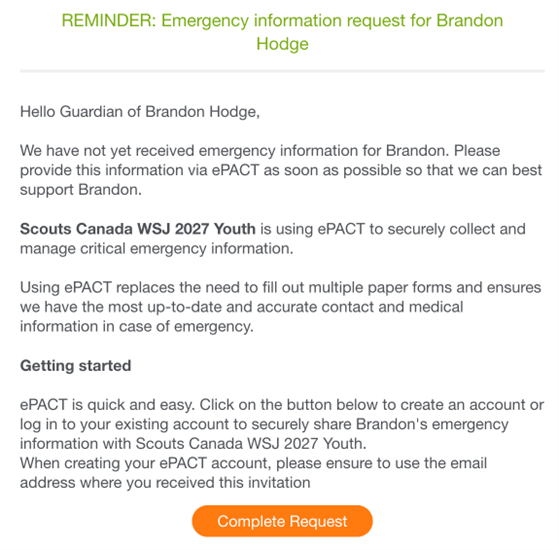
Open the ePACT Invitation Email
Look for an email from [email protected] and click the orange “Complete Request” button.
2
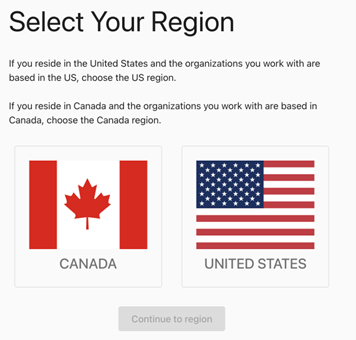
Select Your Region
Select Canada and continue to your specific region.
3
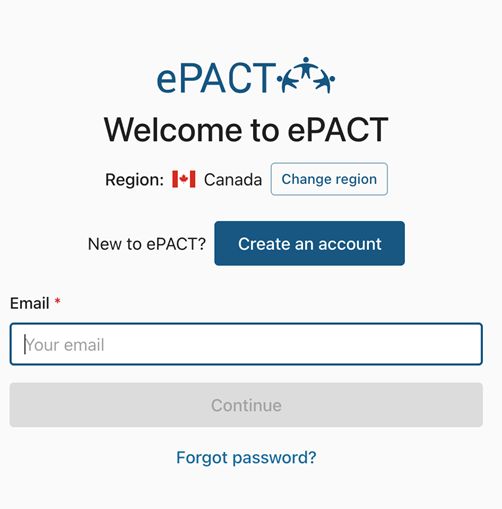
Create or Log Into Your Account
If you are new to ePACT, create an account. If you already have an account, log in using your credentials.
Creating your ePACT Profile
If you haven’t used ePACT before, follow these steps to create your account.
If you attended the previous World Scout Jamboree in 2023 in South Korea, this is the same system and it may remember your profile information.
Note: If you were a youth attendee in WSJ’23, it may pre-populate with some of your parent’s information. Ensure you update it to reflect your own role as an adult at WSJ’27.
1
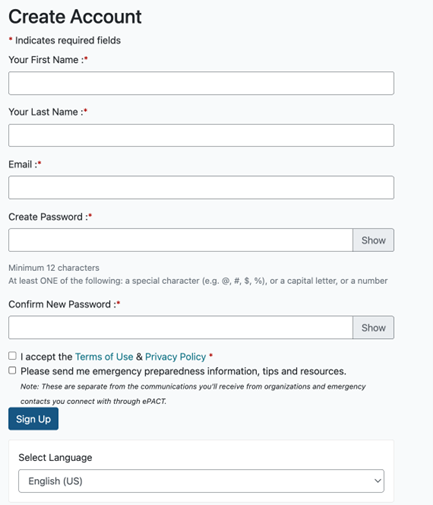
Create your profile
Click on “Create an Account”, and complete the required fields. You’ll also have a chance to select your profile language here, and afterwards you’ll access the system in either French or English.
Note: You must use the same email address that the invitation was sent to.
2
Validate your Email
ePACT will send you another email to validate your email address.
Accept Your Invitation
Once you've logged into the system, select the tab at the top of the screen labeled "My Requests".
You'll see a red dot next to it, indidicating that it's pending your completing the profile. If you've used ePACT before, you might see your older profiles here.
Press "Accept", and then "Let's start" to begin the profile
Enter Your Contact Information
Fill in your contact information on this page - if you're a parent completing the youth profile, this should still be YOUR information, and not your child's.
If you've used ePACT before, it should contain your previous information to verify.
Note: We do not require your Work information; this is a mandatory field in ePACT, but if you leave it as "From home" it won't ask for further details.
Only for Youth Profiles
For youth profiles, you'll enter their information here. Please note that it is mandatory to upload a photo of your youth on this page, as it'll help us at the Jamboree!
Only for Youth Profiles
As the parent who accepted the invitation, you'll automatically be listed as a legal guardian on your youth's profile.
You can add additional parents/legal gaurdians here, and if you provide their email address they'll be invited to create an ePACT account, and will be able to access and update the youth profile as well.
Siblings are not necessary; if you have multiple youth attending the Jamboree you will receive a separate invitation for each, and will need to complete their profile separately.
Only for Youth Profiles
The Jamboree requires us for your - the primary person completing the profile - nationality and preferred language. A simple page!
Emergency Contacts
All members are required to provide two emergency contacts!
For adults, emergency contacts are people we will contact if you are ill, injured, or require assistance.
For youth, emergency contacts are people other than the parents and guardians already listed, who can act as alternative guardians if you are not reachable.
Note: If you've already completed an ePACT profile, you can "Select Emergency Contact" to choose them.
Tell Us About You
This is for the person attending the Jamboree - either you, or your youth depending on the profile you're completing!
Please let us know how you'd like to be referred by, as well as the date of birth and gender. We're limited to the options the Jamboree requires, which is why a specific list is provided. You can also provide us with your pronouns.
We also ask that you provide your primary medical provider's contact information. If the participant seeks medical attention at the Jamboree, we can share that information with the medical provider and request that records be sent back to them - however we can't guaranteee that.
Ensure the Jamboree Knows!
The Polish Jamboree team is very concerned about potential food allergies, since they will be feeding everyone on site.
If you select “Yes” to the known allergies question, a series of more specific questions about food related allergies, their severity, and the required response will appear; please complete this information with as much detail as possible.
Additionally, you can enter any environmental or medication allergies; this information will not be shared with the Polish Jamboree team, but rather used by our own Health & Safety team to ensure you have a safe and amazing experience.
Dietary needs - If you have any requirements or preferences, the Jamboree has provided us with a list of options that we may submit to them. How they plan to use this information is not currently known, but will be shared in the coming months.
Provide Every Detail!
If medications are required, we require you to provide what they are, what it's used for, the dosage, and when it's taken for each individual medication.
Please feel free to add any other information you think we might need to know!
Medical Conditions and Upcoming Procedures
It's critical for us to know if you have any medical conditions, and the details of them!
We also need to know if you have had any recent health issues, or plan for any upcoming medical procedures.
Are you up to date?
We need to know if your or your youth's immunizations are up to date!
Please note that the list (in the blue table) is not mandatory for you to complete, but any and all information you provide us will help to ensure we and the medical professionals can provide proper care if needed.
The Jamboree does need to know if you have had a Tuberculosis test (you don't need to get one, this is only if you have had one), their latest tetanus shot, blood type, and if they have had a Diptheria shot.
We need your passport details
The Jamboree requires us to upload all passport information now, so please provide all of the details!
We also ask that you upload a scan of your current passport in the Shared Files page.
Information for the Jamboree
These questions are being asked by the Jamboree, for them to better understand the needs of contingent members. We do not know how they will use the information, or if specific accommodations will be made, but please complete this section with as much detail as possible.
Upload Key Files Here
This area is where you will be able to upload your passport photo, and any custody agreements if relevant for a youth.
Review and Accept our Code of Conduct
We have updated our Code of Conducts for youth and adult at the Jamboree; once you've provided all of your information you'll be asked to read and accept the Code of Conduct to continue your participation in the contingent.
For Youth: Parents will be required to review the Code of Conduct with the youth member. Both the youth member and the parent will be required to sign the Code of Conduct, which has strict consequences that may result in additional costs if violated.
Multiple Forms Completion
Managing Multiple Requests
Some ePACT accounts may display multiple requests, such as separate forms for adults and youth. Each of these forms must be individually completed and submitted to ensure all necessary information is accurately recorded. Make sure to review each request carefully and follow the steps to completion for every form listed in your account.
Confirmation Checklist
All Pages Completed
Ensure that every required page within the ePACT profile has been filled out completely.
Information Accuracy
Double-check that all information entered is accurate and up-to-date.
Code of Conduct Accepted
Verify that you have reviewed and accepted the updated Code of Conduct as part of the process.
Submit Button Pressed
Confirm that you have pressed the green Submit button on the final page to finalize your profile.
No Outstanding Requests
Check that there are no remaining organization requests for the participant in your ePACT account.